Understanding Modern Web Applications: A Simple Guide

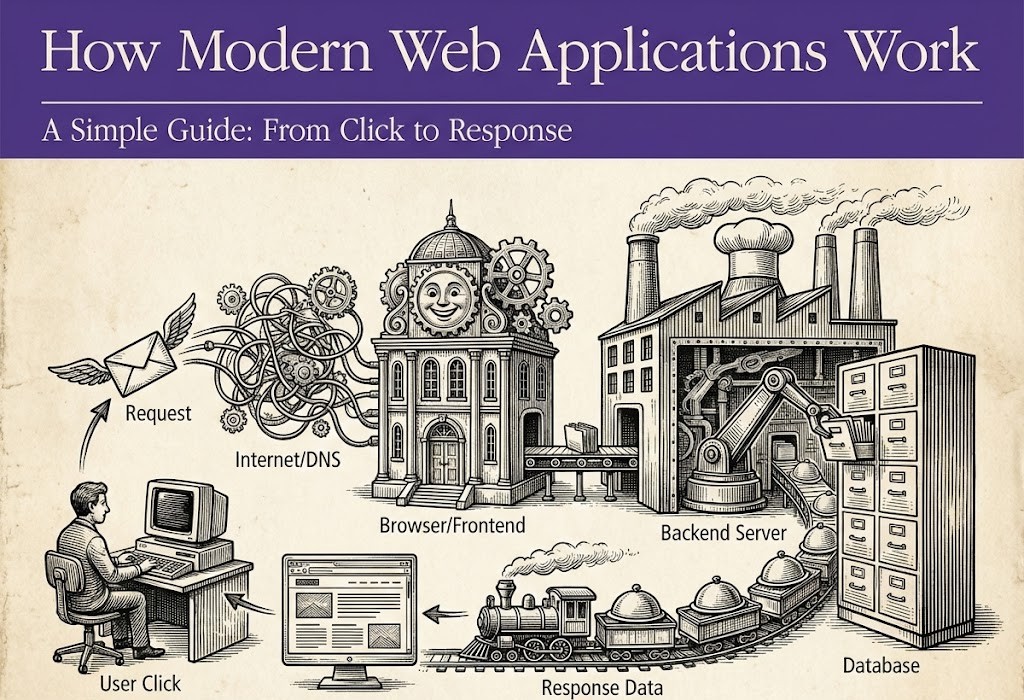
Have you ever wondered what actually happens when you click a link or log into an app? Most of us use the internet every single day, yet the "behind the scenes" of a website remains a mystery.
In the past, websites were just simple pages with text. Today, they are Web Applications—complex systems that can handle payments, stream videos, and even talk back to us using AI.
This guide is designed to explain how these modern applications work in a way that anyone can understand. No confusing jargon, just a clear roadmap from your screen to the server and back.
1. The Starting Point: Typing a URL
Imagine you want to visit a friend's house, but you only know their name, not their address. What do you do? You look them up in a phonebook.
The internet works exactly the same way. When you type www.google.com:
- The Problem: Computers don't understand words like "Google." They only understand numbers called IP Addresses (like
142.250.190.46). - The Solution (DNS): Your browser talks to a DNS (Domain Name System). Think of DNS as the "Phonebook of the Internet." It takes the name you typed and gives the browser the correct number.
- The Connection: Once the browser has the number, it "knocks on the door" of the server where the website lives.
2. The Browser: Your Personal Translator
Your browser (Chrome, Safari, or Edge) is much more than a window. It is a powerful translator. When it connects to a website, it doesn't receive a finished "picture" of the site. Instead, it receives thousands of lines of code.
The browser’s job is to read that code and turn it into the beautiful buttons, images, and text you see. This process happens in milliseconds. Modern browsers also do something called Caching. If you visit the same site twice, the browser "remembers" parts of it so it can load even faster the second time.
3. The Frontend: The "Face" of the App
In the world of web development, we call the part you see the Frontend. To make a great frontend, developers use three main "building blocks":
The House Analogy
To understand the frontend, imagine you are building a house:
- HTML (The Walls): This provides the structure. It says "here is a heading" and "here is a photo."
- CSS (The Paint): This is the style. It decides that the background should be blue and the font should be large.
- JavaScript (The Electricity): This is the magic. When you click a switch and the light turns on, that’s JavaScript. It makes the website interactive—like opening a menu or showing a popup.
Why this matters: A good frontend isn't just about looking pretty; it’s about being easy to use. If a button is hard to find, the frontend design has failed.
4. The Backend: The Invisible Brain
While the frontend is what you see, the Backend is where the actual "thinking" happens. You can think of the backend as the kitchen in a restaurant. You sit in the dining room (Frontend), but the chef (Backend) is in the back preparing your meal.
What happens in the "Kitchen"?
- Security: The backend checks if your password is correct.
- Calculations: If you are booking a flight, the backend calculates the price and checks if there are seats left.
- Communication: The backend is the bridge between your screen and the database where information is kept.
If the backend is slow or has an error, the whole website stops working, even if the frontend looks perfect.
5. Databases: The Memory Bank
A web application needs to remember things. It needs to know your username, your past orders, and your settings. This is where the Database comes in.
There are two main ways to store data:
- Organized Lists (SQL): Think of this like a giant Excel spreadsheet. Everything has a specific row and column. This is great for things like bank accounts or order history.
- Flexible Folders (NoSQL): Think of this like a folder full of Word documents. It’s more flexible and is used for things like social media posts or real-time chats.
Important Note: The frontend never talks to the database directly. That would be like a customer walking into a restaurant kitchen and grabbing food themselves. The backend (the chef) always handles the data to keep it safe.
6. APIs: The "Messengers"
You might have heard the word API before. An API (Application Programming Interface) is simply a messenger.
Imagine you are at a restaurant. You (the Frontend) want a burger. You don't go to the kitchen yourself. You tell the waiter (the API) what you want. The waiter takes your request to the chef (the Backend), and then brings the food back to you.
Without APIs, the different parts of a web application wouldn't be able to talk to each other.
7. Speed and Security: The Two Pillars
A modern web application must be two things: Fast and Safe.
- Speed: People hate waiting. If a site takes more than 3 seconds to load, most people leave. Developers use "Content Delivery Networks" (CDNs), which are servers spread all over the world, to make sure the data doesn't have to travel too far to reach you.
- Security: Since we put our credit cards and private info online, apps must be secure. This is why we use HTTPS (the 'S' stands for Secure). It's like sending your data in a locked box that only the server has the key to open.
8. Where Does AI Fit In?
In 2026, almost every modern app is starting to use Artificial Intelligence. AI usually works as a "helper" inside the backend. It can:
- Suggest products you might like.
- Help you find what you're looking for via a chatbot.
- Detect if someone is trying to hack your account.
AI doesn't replace the website; it just makes it smarter and more personal for you.
9. Common Questions (The Reference Part)
Why is my website slow?
It could be many things: your images are too large, the server is too far away, or there is too much "JavaScript" for your browser to handle at once.
What is the difference between a Website and a Web App?
A website is mostly for reading (like a news site). A web app is for doing things (like Facebook, Gmail, or Amazon).
How do I start building one?
Most people start by learning HTML and CSS. Once you can make a page look good, you learn JavaScript to make it move, and then a backend language to make it think.
Conclusion: Putting it All Together
Building a modern web application is like building a city. You need roads (DNS), buildings (Frontend), power plants (Backend), and libraries (Databases).
When all these parts work together, we get the amazing digital experiences we use every day. Whether you are looking to become a developer or just want to understand the world around you, knowing how these layers connect is the key to mastering the digital age.
Final Thought
The internet is no longer just a collection of pages; it is a massive, living system of data and logic. The next time you click a button, remember the journey your request is taking—it’s a true miracle of modern engineering!